Tag Archives: the service

Reset service light oil life indicator dashboard Audi Q5

How do you reset maintenance light, reset service light indicator Audi Q5, year 2014, 2015. For reset maintenance light and that can be made manually by use button on car dash board.

Reset service light indicator, engine oil life Audi Q5, year 2014, 2015 oil reset instructions:

  1. Start the engine.
  2. Press the carĀ button to access the service menu.
  3. From the carĀ menu select CAR SYSTEMS.
  4. From the CAR SYSTEMS menu select SERVICING & CHECKS.
  5. Select RESET OIL CHANGE INTERVAL and confirm.
  6. Turn off the igntion.
  7. Start the engine and verify the indicator has been reset.

Oil reset service light indicator MINI Paceman

How do you reset maintenance light, reset service light indicator MINI Paceman, year 2013, 2014. For reset maintenance light and that can be made manually by use button on car dash board.

Reset service light indicator, engine oil life MINI Paceman, oil reset instructions:

2013-2014

  1. Turn ignition to Terminal 15 which is one turn of the key or one press of the START/STOP button.
  2. Press and hold the trip odometer reset button for approximately 10 seconds until the first service job appears in the display.
  3. The upper display in the Instrument Cluster will be illuminated with a Service Item (example: An oil can is the designation for Oil Service). The lower display in the Instrument Cluster will indicate the remaining time or mileage left for that Service Item (example: 14000). Press the on-board computer button repeatedly (located on the direction indicator/main-beam switch) to scroll through all of the Condition Based Service Items.
  4. Press and hold the on-board computer button on the direction indicator/main-beam switch until “RESET” appears in the lower display.
  5. Pressing the on-board computer button again resets the service shown in the upper display. Repeat the procedure for each additional service which is to be reset.
  6. Turn the ignition off and start the engine to verify the indicator has been reset.

Oil reset service light indicator Mini Countryman

How do you reset maintenance light, reset service light indicator Mini Countryman, year 2011, 2012, 2013, 2014. For reset maintenance light and that can be made manually by use button on car dash board.

Reset service light indicator, engine oil life Mini Countryman, oil reset instructions:

2011-2014

1. Turn ignition to Terminal 15 which is one turn of the key or one press of the START/STOP button.
2. Press and hold the trip odometer reset button for approximately 10 seconds until the first service job appears in the display.
3. The upper display in the Instrument Cluster will be illuminated with a Service Item (example: An oil can is the designation for Oil Service). The lower display in the Instrument Cluster will indicate the remaining time or mileage left for that Service Item (example: 14000). Press the on-board computer button repeatedly (located on the direction indicator/main-beam switch) to scroll through all of the Condition Based Service Items.
4. Press and hold the on-board computer button on the direction indicator/main-beam switch until “”RESET”” appears in the lower display.”
5. Pressing the on-board computer button again resets the service shown in the upper display. Repeat the procedure for each additional service which is to be reset.
6. Turn the ignition off and start the engine to verify the indicator has been reset.
Oil reset service light indicator Mini Clubman

How do you reset maintenance light, reset service light indicator Mini Clubman, year 2008, 2009, 2010, 2011, 2012, 2013, 2014. For reset maintenance light and that can be made manually by use button on car dash board.

Reset service light indicator, engine oil life Mini Clubman, oil reset instructions:

2008-2014

  1. Turn ignition to Terminal 15 which is one turn of the key or one press of the START/STOP button.
  2. Press and hold the trip odometer reset button for approximately 10 seconds until the first service job appears in the display.
  3. The upper display in the Instrument Cluster will be illuminated with a Service Item (example: An oil can is the designation for Oil Service). The lower display in the Instrument Cluster will indicate the remaining time or mileage left for that Service Item (example: 14000). Press the on-board computer button repeatedly (located on the direction indicator/main-beam switch) to scroll through all of the Condition Based Service Items.
  4. Press and hold the on-board computer button on the direction indicator/main-beam switch until “RESET” appears in the lower display.
  5. Pressing the on-board computer button again resets the service shown in the upper display. Repeat the procedure for each additional service which is to be reset.
  6. Turn the ignition off and start the engine to verify the indicator has been reset.

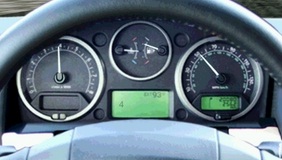
Oil reset service light indicator Land Rover Discovery 3

Reset service light indicator Land Rover Discovery 3. How to reset maintenance light, reset oil service light. Can be made manually by use button on car dash board.

Reset service light indicator Land Rover Discovery 3.

Procedure to check/reset service status, distance counter on a Land Rover Discovery 3.

  1. Switch ignition OFF.
  2. Press and Hold left instrument panel reset button, switch ignition ON to position I (accessories).
  3. Keep reset button pressed for approximately 5 seconds until the LCD displays RESET SIA.
  4. The distance to service (e.g. 2150 miles) and the service type (e.g. Inspection/oil service) will be displayed.
  5. Has the Reset Distance limit been reached or exceeded? o NO.
  6. Follow instructions in section 2 below o YES Follow Reset Distance Counter instructions below Reset Distance counter procedure.
  7. Press and hold left instrument reset button for 5 seconds. RESET will begin to flash on the LCD display.
  8. To reset distance the left hand button should be pressed before the RESET message has flashed 5 times. The LCD will display END SIA. Switch ignition off.

Procedure to check/reset service status date counter on a Land Rover Discovery 3.

  1. Press left instrument panel reset button once.
  2. The LCD will display RESET SIA followed by the service due date.
  3. Has the Reset Date limit been reached or exceeded? o NO.
  4. Press the left instrument button once.
  5. The LCD will display END SIA to indicate the service interval check/reset procedure has been cancelled. o YES, Follow Reset Date Counter instructions below Reset Date counter procedure.
  6. Press and hold left instrument reset button for 5 seconds.
  7. RESET will begin to flash on the LCD display.
  8. To reset distance the left hand button should be pressed before the RESET message has flashed 5 times.
  9. The LCD will display END SIA. Switch ignition off.

oil-reset-service-light-indicator-Land-Rover-Discovery-3