Tag Archives: oil life

Oil service reset Chevrolet GMC Trucks Acadia

How do you reset maintenance light, reset service light indicator Chevrolet GMC Trucks Acadia. For reset maintenance light and that can be made manually by use button on car dash board.

Reset service light indicator, engine oil life Chevrolet GMC Trucks Acadia, oil reset instructions:

2007

With Driver Information Centre (DIC):
Turn the ignition to run (one position before starting engine).
Press the MODE button until the DIC reads OIL LIFE LEFT/HOLD SET TO RESET.
Press and hold the SET button until 100% is displayed. You will hear 3 chimes and the CHANGE ENGINE OIL SOON message will go off.
Turn the ignition off and then start the engine to verify the indicator has been reset.
Without Driver Information Centre (DIC):
Turn the ignition to run (one position before starting engine).
Immediately after Step 1 press and release the gas pedal 3 times within 5 seconds.
Turn the ignition off and then start the engine to verify the indicator has been reset.

2008-2010

With Driver Information Centre (DIC):
Turn the ignition to run (one position before starting engine).
Press the vehicle information button (i) until OIL LIFE REMAINING displays.
Press and hold the SET/RESET (check mark) button until 100% is displayed. You will hear 3 chimes and CHANGE ENGINE OIL SOON message will go off.
Turn the ignition off and then start the engine to verify the indicator has been reset.
Without Driver Information Centre (DIC):
Turn the ignition to run (one position before starting engine). The vehicle must be in PARK (P) to access this display. Press the trip odometer reset stem until OIL LIFE REMAINING displays.
Press and hold the trip odometer reset stem until OIL LIFE REMAINING shows 100%. You will hear 3 chimes and the CHANGE ENGINE OIL SOON message will go off.
Turn the ignition off and then start the engine to verify the indicator has been reset.

Oil service reset Mercury Monterey

How do you reset maintenance light, reset service light indicator Mercury Monterey, year 2004, 2005, 2006, 2007. For reset maintenance light and that can be made manually by use button on car dash board.

Instructions to reset service indicator 2004-2007

  • Turn the ignition to run (one position before starting engine).
  • Press the STATUS control to access the System Check function.
  • Press RESET to reset oil %.
  • Press and hold the RESET control to set to 100%. After a successful reset, the message centre will display OIL LIFE SET TO 100%.
  • Turn the ignition off and then start the engine to verify the indicator has been reset.

Oil service reset Mercury Mountaineer

How do you reset maintenance light, reset service light indicator Mercury Mountaineer, year 1999. 2000, 2001, 2002, 2003, 2004, 2005, 2006, 2007, 2008, 2009, 2010. For reset maintenance light and that can be made manually by use button on car dash board.

Instructions to reset service indicator 1999-2010

1999-2001

Turn the ignition to run (one position before starting engine).
press and hold the OIL CHANGE RESET control for 5 seconds. The message centre will count down for 5 seconds and the message centre will display “OIL LIFE RESET TO 100%”.
Turn the ignition off and then start the engine to verify the indicator has been reset.

2002-2003

Turn the ignition to run (one position before starting engine).
Press the SETUP control to access the System Check function.
Press and release the RESET control to display “OIL LIFE XX% HOLD RESET NEW”.
Press and hold the RESET control for 2 seconds to display “IF NEW OIL HOLD RESET”.
Press and hold the RESET control to display “OIL LIFE SET TO 100%”. Your oil life is now reset.
Turn the ignition off and then start the engine to verify the indicator has been reset.

2004-2005

Turn the ignition to run (one position before starting engine).
Select this function from the SETUP control “PRESS RESET AT OIL CHANGE”.
Press RESET control to reset oil change.
Turn the ignition off and then start the engine to verify the indicator has been reset.

2006-2007

Turn the ignition to run (one position before starting engine).
Enter SYSTEM CHECK to display “OIL XXX% OIL LIFE OK”.
Press RESET button to display “HOLD RESET IF NEW OIL”.
Press and hold the RESET button for more than two seconds. Oil life is set to 100% and “OIL CHANGE SET TO 100%” is displayed.
Turn the ignition off and then start the engine to verify the indicator has been reset.

2008-2010

Turn the ignition to run (one position before starting engine).
Press SETUP to display OIL LIFE %.
Press RESET button to display “HOLD RESET IF NEW OIL”.
Press and hold the RESET button for more than two seconds. Oil life is set to 100% and “OIL CHANGE SET TO 100%” is displayed.
Turn the ignition off and then start the engine to verify the indicator has been reset.

Oil service reset Mercury Sable

How do you reset maintenance light, reset service light indicator Mercury Sable, year 2008, 2009, 2010. For reset maintenance light and that can be made manually by use button on car dash board.

Instructions to reset service indicator 2008-2010

  • Turn the ignition to run (one position before starting engine).
  • Press and release SETUP to display “OIL LIFE XXX% HOLD RESET = NEW”.
  • Press and hold RESET for 2 seconds and release to reset the oil life to 100%.
  • Turn the ignition off and then start the engine to verify the indicator has been reset.

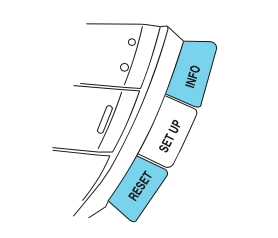
Mercury-Sable-Controls

Oil service reset Mercury Milan

How do you reset maintenance light, reset service light indicator Mercury Milan, year 2008, 2009, 2010. For reset maintenance light and that can be made manually by use button on car dash board.

Instructions to reset service indicator 2008-2010

  • Turn the ignition to run (one position before starting engine).
  • Press and release SETUP to display “OIL LIFE XXX% HOLD RESET = NEW”.
  • Press and hold RESET for 2 seconds and release to reset the oil life to 100%.
  • Turn the ignition off and then start the engine to verify the indicator has been reset.