Tag Archives: 2015

Reset service light oil life indicator dashboard Honda Fit

How do you reset maintenance light, reset service light indicator Honda Fit, year 2014, 2015. For reset maintenance light and that can be made manually by use button on car dash board.

Reset service light indicator, engine oil life Honda Fit, year 2014, 2015 oil reset instructions:

  1. Turn the ignition to run (one position before starting engine).
  2. Press the SELECT/RESET knob repeatedly until the engine oil life indicator is displayed.
  3. Press the SELECT/RESET knob for more than 10 seconds. The engine oil life indicator and the maintenance code(s) will blink.
  4. Press the SELECT/RESET knob for more than 5 seconds. The maintenance items code(s) will disappear, and the engine oil life will reset to 100.
  5. Turn the ignition off and then start the engine to verify the indicator has been reset.
Reset service light oil life indicator dashboard Chrysler 200

How do you reset maintenance light, reset service light indicator Chrysler 200, year 2014, 2015. For reset maintenance light and that can be made manually by use button on car dash board.

Reset service light indicator, engine oil life Chrysler 200, year 2014, 2015 oil reset instructions:

  1. Turn the ignition to run.
    *one position before starting engine
  2. Fully depress the accelerator pedal slowly three times within 10 seconds.
  3. Turn the ignition off and then start the engine to verify the indicator has been reset.
Reset service light oil life indicator dashboard Audi A4

How do you reset maintenance light, reset service light indicator Audi A4, year 2013, 2014, 2015. For reset maintenance light and that can be made manually by use button on car dash board.

Reset service light indicator, engine oil life Audi A4, year 2013, 2014, 2015 oil reset instructions:

  1. Start the engine.
  2. Press the CAR button to access the service menu.
  3. From the CAR menu select CAR SYSTEMS.
  4. From the CAR SYSTEMS menu select SERVICING & CHECKS.
  5. Select RESET OIL CHANGE INTERVAL and confirm.
  6. Turn off the igntion.
  7. Start the engine and verify the indicator has been reset.

Reset service light oil life indicator dashboard Chevrolet Silverado

How do you reset maintenance light, reset service light indicator Chevrolet Silverado, year 2013, 2014, 2015. For reset maintenance light and that can be made manually by use button on car dash board.

Reset service light indicator, engine oil life Chevrolet Silverado, year 2013, 2014, 2015 oil reset instructions:

  1. Turn the ignition to run (one position before starting engine).
  2. *Display the OIL LIFE REMAINING on the DIC (i button). If the vehicle does not have DIC buttons, the vehicle must be in P (Park) to access this display by pressing the trip odometer reset stem.
  3. Press and hold the SET/RESET (arrow) button on the DIC, or the trip odometer reset stem if the vehicle does not have DIC buttons for more than 5 seconds. The oil life will change to 100%.
  4. Turn the ignition off and then start the engine to verify the indicator has been reset.
    *Remaining oil life can also be reset by depressing the gas pedal 3 times within 5 seconds instead of using the DIC.

Reset service light oil life indicator dashboard Honda CR-V

How do you reset maintenance light, reset service light indicator Honda CR-V, year 2013, 2014, 2015. For reset maintenance light and that can be made manually by use button on car dash board.

Reset service light indicator, engine oil life Honda CR-V, year 2013, 2014, 2015 oil reset instructions:

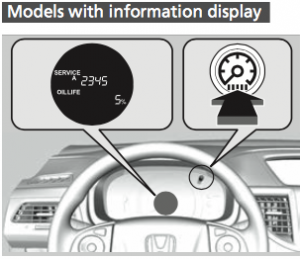
Models with information display:

Indicator oil reset light service Honda CR-V

  1. Turn the ignition switch to ON (do not start the engine).
  2. Display the engine oil life by repeatedly pressing the (Select/Reset) knob.
  3. Press and hold the knob for 10 seconds or more. The engine oil life indicator and the maintenance item codes blink.
  4. Press the knob for five seconds or more. The displayed maintenance items disappear, and the engine oil life display returns to 100%.
  5. Turn the ignition off and then start the engine to verify the indicator has been reset.

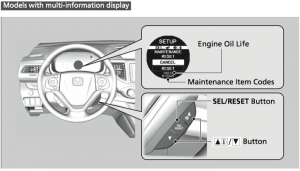
Models with multi-information display:

Indicator oil reset light service Honda CR-V display

  1. Turn the ignition switch to ON (do not start the engine).
  2. Select VEHICLE SETTINGS using the up or down arrows, then press the SEL/RESET button.
  3. Select MAINTENANCE RESET using the up or down arrows, then press the SEL/RESET button.
  4. Select RESET using the up or down arrows, then press the SEL/RESET button. The displayed maintenance items disappear, and the engine oil life display returns to 100%.
  5. Turn the ignition off and then start the engine to verify the indicator has been reset.